simple

By on June 29, 2009 in How-To Humor
photo by scol22

photo by scol22

Last week I talked about the simple presentation tip of using metaphors to improve understanding and retention of your material.  But how do you find a good metaphor?

What Makes a Good Metaphor

Not all metaphors are created equal.  Some can help you explain every detail of your presentation topic, while others barely provide any benefit.

What makes for a good metaphor?  While there is no exact science, there are some guidelines:

  1. It Should Simplify – The metaphor should actually simplify your topic, not make it more cumbersome to understand.
  2. Your Audience Should Get It – An amazing metaphor relating a new reporting system to thermodynamics isn’t helpful if your audience doesn’t understand thermodynamics.  That’s not say your metaphor has to speak for itself–you can explain what it is you are relating to, but the audience should be able to get it with only a brief explanation.
  3. It Should Be Extendable - The best metaphors are those that you can extend throughout your presentation, simplifying each individual component and then bringing it together all at the end.

How to Select a Metaphor

The biggest barrier to using metaphors in a presentation is actually finding one that will work for your topic.  We don’t have all day to think of different metaphors and apply them to our work; we do have to actually get the work done.  But taking time now to ensure your audience understands what you’re saying will save you a lot of time, and trouble, in the future.

Generating ideas isn’t that difficult.  The first step to finding an appropriate metaphor is limiting your brainstorming–there are only so many references that can adequately describe a new reporting system.

Some helpful hints in brainstorming metaphors:

  1. Think of Things Everyone Knows - The best metaphors are those that require little explanation.  Relating to things people already know well makes your job easier.  Some common concepts most people already understand include cars (dashboard, engines, overall design), cities, computers, technology, pop-culture, and sports.
  2. Think About What You Are Presenting – Oversimplify what it is you are presenting or proposing and get down to it’s most basic level–is it a change in process, a revolutionary product, a way to simplify?  Then think of something that at it’s root level is the same.  Compare the change from one system to another to the transition of newspapers to online news sites.  Compare the new product to the iPod.  Compare the simplification to a car dashboard.
  3. Think About What You Know – A metaphor that requires hours of research to pull off correctly can be too time-consuming to actually use.  Think of the things you know well, or are passionate about.  I often use stand-up and improv comedy concepts as metaphors because I love comedy, it’s interesting for the audience, and I know it.

Once you have a narrowed list of possibilities, you can just apply the guidelines for a good metaphor and choose one.  You don’t have to find the perfect metaphor, just one that highlights your key points.

And not every aspect of the metaphor need apply–many people reference pyramids as an example of how a strong base is important to the overall structure, but few mention that the pyramids of Egypt were made by slaves. It doesn’t mean the pyramid isn’t analogous, just that it isn’t a perfect metaphor.

Applying Your Metaphor

After you’ve decided on the metaphor, applying it to your topic is the easiest part.  You can do this by examining each of the high-level items of your proposal (title slides, paragraph headings, etc) and mapping it to your metaphor.

From there, you’ll find you can express your metaphor in natural ways in your presentation or writing.  The end result?  A better presentation that is engaging and improves retention and understanding.

How do you pick the metaphors you use in your presentations? Share some ideas in the comments.

{ Be the first to comment }

By on June 22, 2009 in Learn with Humor

“Making the simple complicated is commonplace; making the complicated simple, awesomely simple, that’s creativity.” - Charles Mingus

One of the hardest things to do is to take a complicated idea and explain it in a simple way.  But that is in fact what many of us have to do, and those who do it well will find success.  Einstein was a genius not because he theorized about things like mass-energy equivalence (others had done it before him), but because he could distill it down to E = mc².

In the corporate world, we may not be theorizing on the conservation of mass and energy, but we do have to give recommendations, pitches, and reviews.  And often the subject is far from simple (ever have to give a detailed presentation on a computer model that simulates consumer trends?).  So how do you simplify a complex topic? Simple: Metaphor.

The Metaphor

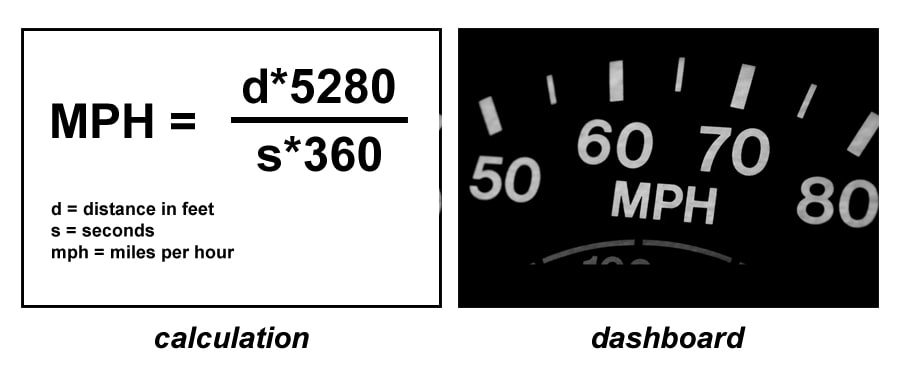
A metaphor is to presenting as a dashboard is to driving a car.  A good metaphor simplifies a topic and improves understanding, just as a dashboard simplifies information about a car and improves the driver’s ability to drive the car effectively.  I know I’m a better driver because I can just look at my speedometer and not try to calculate my speed by dividing distance by time.
dashboard-calc

Why Use Metaphors

But why even use a metaphor in your presentation?  Why not just require everyone to learn the MPH (or KPH) calculation?  After all you had to learn it in order to create the dashboard.  But that’s often our job, to simplify, even if not expressed explicitly.  If my job is to recommend a new reporting system, I have to make that recommendation in a way that will best explain my proposal and clearly articulate it’s value to my managers.  If the buyers don’t understand it, why would they buy it?

Does it mean extra work on your part? Definitely.  But the reward for doing so is success; you’ll improve retention and understanding because not only are you explaining the topic in a way that people understand, but you are also doing it in a unique, memorable way.

And while you could just show a single slide in your presentation or single paragraph in your proposal of your metaphor, the true simplification and power comes from extending that metaphor throughout the entire presentation, integrating it into each of the complex details.  Then, at the end, if the audience understands the concept of a dashboard, they also understand the value of metaphors in improving presentations.

The Metaphorical Payoff

The value of a great metaphor is that it can summarize your entire presentation in a single concept.  It can encapsulate everything you are trying to say in a single place, simplified and holistic, like a dashboard in a car that displays relevant information that makes driving easier.   The benefit is two-fold: it requires you to fully understand your idea enough to state it simply, and it allows people to walk away with an analogy in their head–”ah yes, metaphors in my presentations are like the dashboard in my car.”

It doesn’t have to be revolutionary; that’s not your goal.  Your goal is to simplify, relate to the audience, and increase their understanding.  After that, it’s up to the idea itself to gain approval, but you’ll have at least have presented in a way that people can understand.

Do you use metaphors in your work?  If so, what are some of your favorite ones you used?  If not, why? Let me know in the comments.
{ Be the first to comment }

By on March 5, 2009 in How-To Humor

If your work place is anything like mine, it relies entirely too much on acronyms. Reading some documents looks like someone just randomly hit keys on the keyboard.

If you want to bring some humor to the workplace, while at the same time rebelling against the use of confusing acronyms, start naming projects with a little bit of humor and some anti-acronym titles.  For example, you might try:

  • Database Utility Management Builder
  • Design Office Header
  • Advanced Software Systems

With a quick easy fix, people will either choose to call your project by its full name, or you’ll at least have some fun when they refer to it by acronym.

{ Be the first to comment }